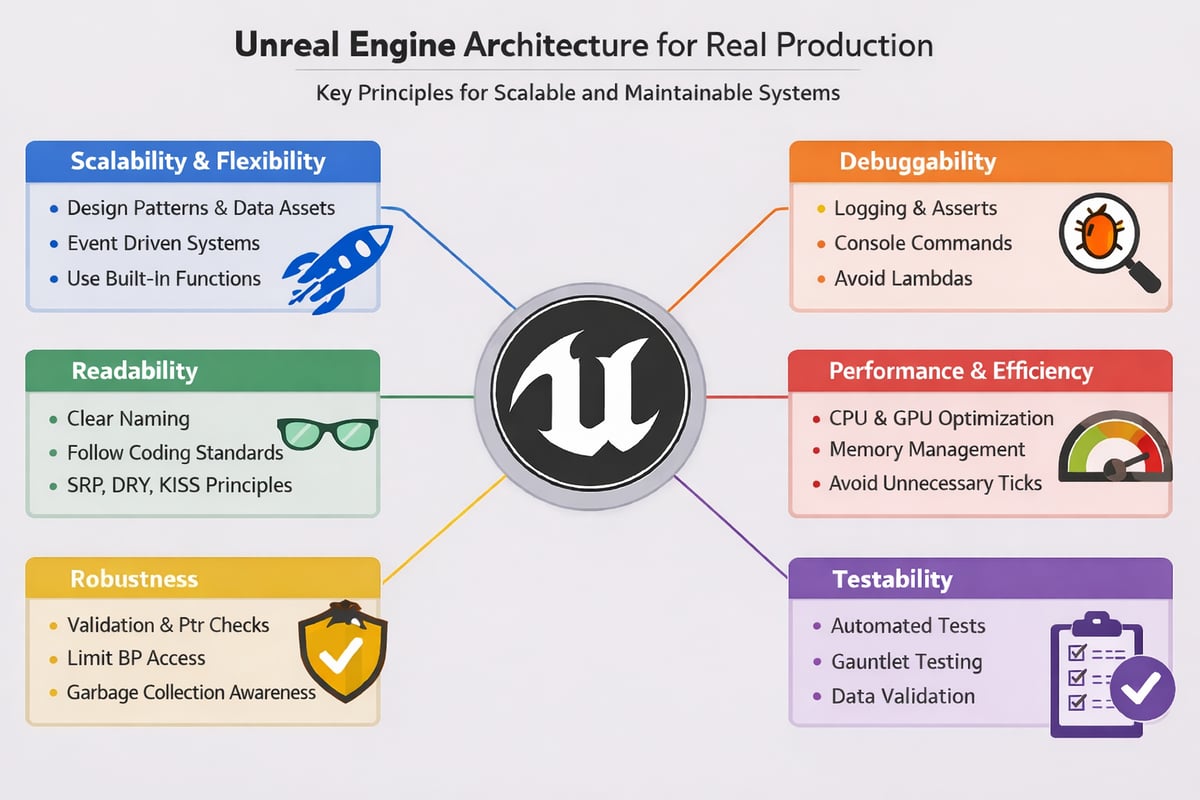
Good architecture isn’t about being clever or overengineered, it should be the norm.
Most Unreal projects don’t fail because the idea was bad. They fail because iteration becomes slow, debugging becomes risky, and nobody fully trusts the systems anymore. I’ve made those mistakes myself. This article exists because going fast early often costs far more than it saves.
The lists for each reach category aren’t exhaustive.
Scalability & Flexibility
Scalability is the ability of a system to grow in scope, complexity, and usage without becoming fragile or increasingly expensive to change. A scalable system continues to behave predictably as features, content, and team size increase, instead of accumulating hidden coupling and unintended side effects. In Unreal Engine projects, scalability issues rarely appear during early prototypes. They surface later, when systems that were designed for a single use case are stretched to support multiple game modes, characters, or platforms.
- Use well-known design patterns with clear interfaces. Favor component-based and data-driven architectures, especially through Data Assets and Data Tables, to decouple logic from content.
- Event-driven systems scale better than tightly coupled flows. Gameplay Tags, GAS, delegates, and messaging systems help reduce dependencies and keep features modular.
- Avoid reinventing the wheel. Prefer built-in Unreal Engine functionality over custom solutions whenever possible. This keeps systems consistent, easier to maintain, and more compatible with engine updates.
Debuggability
Debuggability is the ability to inspect, understand, and reason about a system while it is running. A debuggable system makes its internal state visible, exposes meaningful signals when something goes wrong, and allows developers to trace behavior without guessing or rewriting code just to understand what happened. In Unreal Engine projects, poor debuggability often turns minor issues into major blockers. Bugs that could have been trivial to fix become time-consuming because state is hidden, logs are noisy or missing, and call stacks are difficult to follow
- Design systems that are easy to inspect at runtime. Logging should be intentional and structured, with clear log categories per system.
- Use asserts to fail early and loudly when assumptions break. Defensive programming is cheaper than debugging crashes later.
- Avoid lambdas in critical gameplay paths. They make call stacks harder to read and debugging more painful.
- Leverage console commands and CVars to tweak, enable, or disable features at runtime without recompiling.
- Visual debugging matters. Draw debug shapes, traces, and state when appropriate.
- Use sane defaults and optional types where possible. Make invalid states hard to reach.
- Building in C++ helps a lot. Attaching a standalone process to an IDE is significantly easier than debugging inside the editor, which often slows iteration and hides real issues.
Readability
Most developers read far more code than they write.
- Naming, structure, and context matter. Avoid magic values, document intent, and make dependencies explicit.
- Follow Epic’s coding standards and your studio’s guidelines consistently. Consistency reduces cognitive load and speeds up reviews.
- Systems should be easy to disable, via components, booleans, or feature flags. Debug-only UI, whether ImGui or Unreal-based, should be trivial to turn on and off.
- Documentation does not need to be perfect, but it must exist. Code reviews are not optional, they are a core part of maintaining quality.
Robustness
Robustness is the ability of a system to behave correctly under a wide range of conditions, including invalid data, unexpected states, lifecycle changes, and different runtime environments. A robust system does not assume ideal usage, it anticipates failure and handles it explicitly instead of crashing, corrupting state, or silently breaking. In Unreal Engine projects, robustness issues often surface when moving from editor to standalone builds, changing platforms, etc.
- Understand Unreal’s reflection system, garbage collector, containers, and pointer types. Not just how to use them, but how they behave under stress.
- Use data validators and limit Blueprint access to critical variables and functions. Expose only what is safe and intentional.
- Practice defensive programming. Validate inputs, check pointers, use IsValid, and avoid fragile timing logic like delays where possible.
- Solid validation and defensive code dramatically reduce crashes and undefined behavior.
Performance & Efficiency
Performance is the ability of a system to deliver its intended behavior within acceptable CPU, GPU, and memory budgets, consistently and predictably, across all target platforms. A performant system does not rely on last-minute optimization passes to function correctly, it is designed from the start with cost, scale, and constraints in mind. In Unreal Engine projects, performance issues rarely come from a single expensive function. They emerge gradually from small, repeated decisions, unnecessary ticks, overly complex update paths, uncontrolled asset references, or systems that scale poorly as content grows. When performance is treated as something to “fix later,” those decisions compound, and the cost of correcting them increases dramatically over time.
- Always keep CPU, GPU, and memory in mind. Avoid unnecessary ticks and disable them by default. Use the Significance Manager where appropriate.
- Be mindful of asset management. Package only what is needed, and understand the cost of hard versus soft references.
- Capacity planning matters. Efficient systems scale better and give you more room to iterate later.
Testability
Testability is the ability of a system to be validated automatically, repeatedly, and with minimal friction. A testable system makes its assumptions explicit, exposes clear inputs and outputs, and can be exercised without relying on fragile editor state, manual setup, or hidden dependencies. In Unreal Engine projects, testability is often misunderstood or ignored entirely, especially early in development. Features are validated manually, bugs are fixed in isolation, and regressions are discovered late, usually after they have already impacted other systems. This works for small prototypes, but it does not scale to real production.
- Use unit tests where possible. Automate validation through Unreal’s automation framework.
- Gauntlet tests help prevent regression bugs on larger projects.
- Maintain test maps, data validation workflows, and scripted test scenarios to catch issues early and consistently.
Final Thoughts
Clean architecture and good organization are not academic exercises. They save time, reduce bugs, improve collaboration, and allow projects to scale without collapsing under their own complexity.
Good code is not just code that works today. It’s code that still makes sense six months later, to someone who didn’t write it.
Yoan.